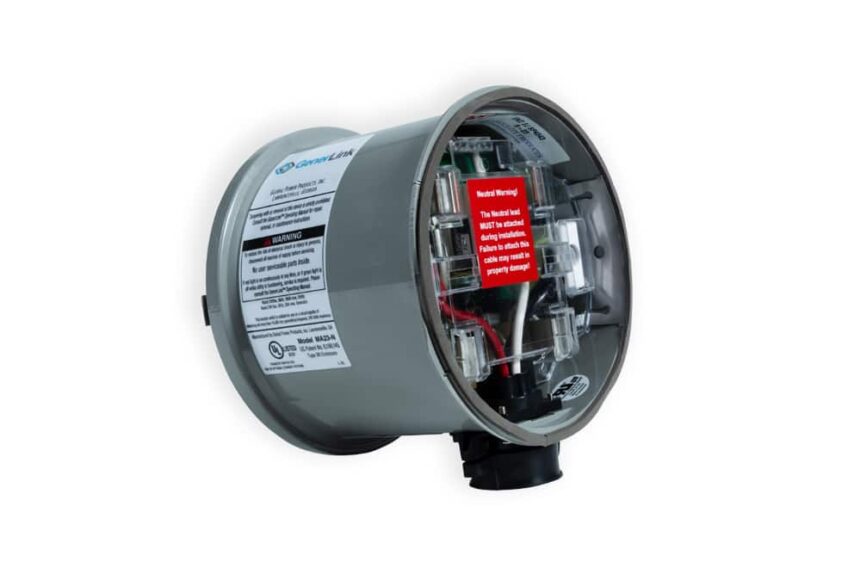
Have you ever thought about how convenient it would be to power your entire home during an outage without fumbling with extension cords or installing a complicated system? That’s where GenerLink comes in. GenerLink is a meter-mounted transfer switch that lets you connect your portable generator directly to your home’s electrical system. This means when the power goes out, you can run essential appliances like your refrigerator, lights, and even your furnace safely and easily. Designed for simplicity and safety, GenerLink is growing in popularity across the United States as homeowners look for more reliable backup power solutions. If you’re curious about how it works, why you should consider one, and how to get it installed, this beginner-friendly guide explains it all.
How Does GenerLink Work?
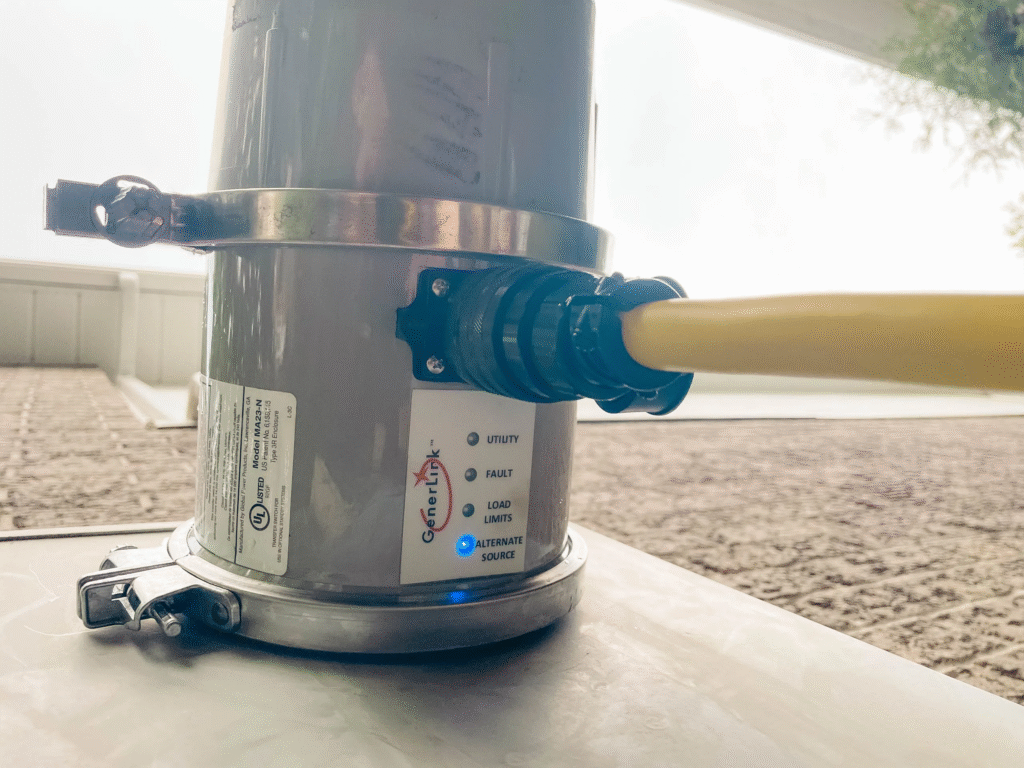
GenerLink is installed directly behind your home’s electric meter by your utility provider or a licensed electrician. Once it’s in place, you simply plug your portable generator into the GenerLink device using a heavy-duty cord. When the utility power goes out, the GenerLink automatically detects the outage and allows your generator to send power safely to your home’s electrical panel.
This setup eliminates the need for running extension cords through windows or doors. It also prevents dangerous backfeeding, which happens when electricity flows back into the power lines and endangers utility workers. GenerLink’s smart design ensures that power from your generator stays isolated from the utility grid, providing a seamless and safe transfer of power.
Unlike manual transfer switches, which require manual switching and rewiring, GenerLink’s plug-and-play setup means you just connect your generator and you’re ready. It’s ideal for people who want a hassle-free backup power solution without complicated installations.
Why Should You Use GenerLink?
Power outages can disrupt your life in many ways – food spoils in refrigerators, sump pumps stop working, and heating systems go offline during cold weather. GenerLink solves these problems by making it incredibly easy to keep your home running during blackouts.
One of the main benefits of GenerLink is its simplicity. There’s no need for expensive whole-house generators or permanent wiring. You can use a portable generator you already own and power multiple circuits in your home safely.
GenerLink also gives you flexibility because you can choose which appliances and circuits to run, depending on your generator’s capacity. Plus, since it connects at the meter, it provides power to your entire breaker panel (within the limits of your generator), instead of forcing you to pick and wire specific circuits like traditional transfer switches.
For homeowners in storm-prone areas, or those looking for a cost-effective backup power solution, GenerLink offers peace of mind knowing that you’ll be ready when the lights go out.
GenerLink Installation Made Simple
Unlike other solutions that require a complex installation inside your home, GenerLink’s installation is fast and straightforward. However, because it involves working with your home’s electrical meter, it’s usually handled by your utility company or a licensed electrician.
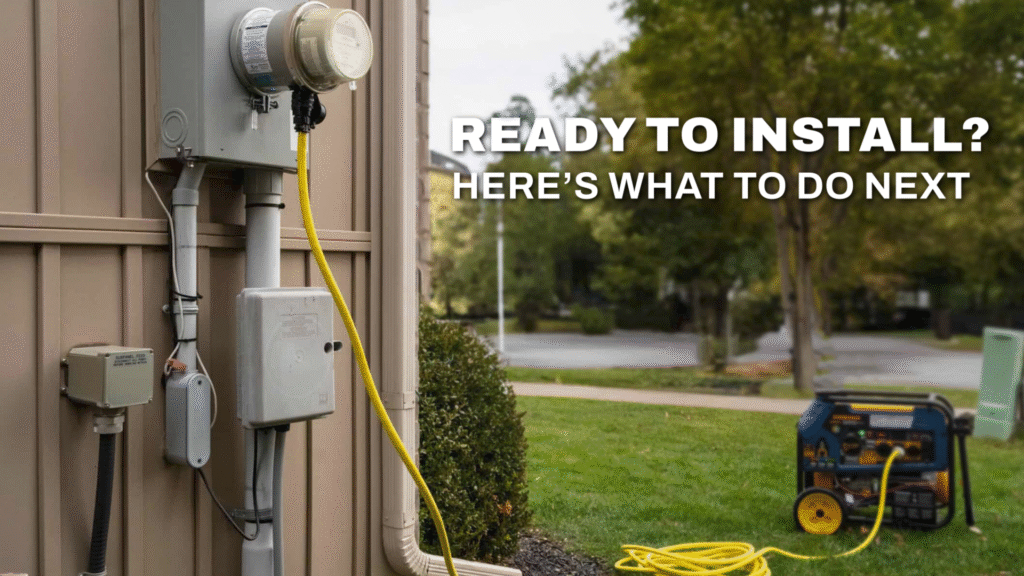
Once installed, GenerLink sits neatly behind your meter. The process doesn’t require any major rewiring or interior electrical work. After installation, all you need is a portable generator and the proper GenerLink-compatible power cord to connect the two.
With this system in place, you can be ready for emergencies without any additional preparation.
Do You Need an Electrician?
Yes, GenerLink installation should be performed by a licensed electrician or your local utility provider. Since the device connects to the meter socket, this isn’t something a homeowner should attempt alone. Working around a live meter involves serious electrical hazards, and utilities often require professionals to handle these installations for safety and regulatory reasons.
How Long Does It Take to Install?
The installation process is surprisingly quick. For most homes, it takes about 30 minutes to an hour. However, this can vary depending on your utility provider’s schedule and any necessary permits. Some utility companies even offer same-day installations if you schedule in advance.
Can You Install It Yourself?
No, GenerLink installation is not a DIY project. Because it requires removing your electric meter, only trained professionals or utility technicians are authorized to install it. Attempting to install it yourself could void warranties, violate local codes, and create dangerous electrical risks.
GenerLink vs Manual Transfer Switch
Many homeowners wonder how GenerLink compares to a manual transfer switch. The main difference is where and how the devices connect. Manual transfer switches are installed inside your home’s electrical system and require you to select specific circuits that will receive generator power. This means if you forget to include a critical circuit, you won’t be able to power it during an outage.
GenerLink, on the other hand, connects at the meter and feeds power to your entire breaker panel. You’re not locked into predetermined circuits – you can choose which appliances to run by managing your breaker switches and generator load.
Additionally, manual transfer switches often involve higher installation costs and more complex wiring, while GenerLink’s meter-based installation is faster and usually cheaper.
Which Generators Work With GenerLink?
GenerLink is compatible with most portable generators rated at 7,000 watts or higher that have a 240V outlet. It requires a generator with a four-prong, 240V locking receptacle (L14-30 or L14-20) and proper grounding.
Generators from brands like Honda, Generac, Champion, Westinghouse, and Briggs & Stratton often work well with GenerLink as long as they meet these specifications. Before purchasing a generator, check with your utility provider or GenerLink’s compatibility chart to ensure your model is approved.
Compatible Generator Types
GenerLink supports conventional portable generators and inverter generators that produce clean, stable power. However, it’s important to match your generator’s wattage to your household needs and to avoid overloading the system.
What Size Generator Do You Need?
The size of generator you need depends on how many appliances you want to run. For basic essentials like a refrigerator, lights, and a furnace, a 7,500–10,000-watt generator is usually sufficient.
If you plan to run high-demand appliances such as electric water heaters or central air conditioning, you may need a 12,000-watt or larger generator. Always calculate your total load requirements and choose a generator slightly above that for safe operation.
Is GenerLink Safe to Use?
Yes, GenerLink is designed with multiple built-in safety features. It prevents dangerous backfeeding to utility lines, protecting line workers and your home’s electrical system. It also includes surge protection (in some models) to guard against voltage spikes when switching power sources.
Many utility companies endorse GenerLink because it complies with safety regulations and is tested to meet industry standards.
How Much Does GenerLink Cost?
The cost of a GenerLink device typically ranges from $700 to $1,500 depending on the model and features, such as built-in surge protection. Installation fees vary, but many utility companies offer installation for a flat fee between $150 and $300.
While the upfront cost may seem high, it’s often less expensive than installing a manual transfer switch or a whole-home standby generator.
Where Can You Buy GenerLink?
GenerLink devices are not sold in big box stores like Home Depot or Lowe’s. Instead, you must purchase them directly through your utility provider or approved dealers. Many utility companies partner with GenerLink’s manufacturer to provide the device and installation as part of their service.
Before buying, contact your electric utility to confirm they allow GenerLink installations in your area and to schedule an appointment.
The Bottom Line
GenerLink is a game-changer for homeowners looking for a safe, reliable, and easy way to power their homes during outages. By connecting directly at your meter, it eliminates the need for extension cords and complicated rewiring. Paired with a properly sized portable generator, it can keep your essential systems running until utility power is restored.
For those living in areas prone to severe weather or frequent outages, GenerLink offers peace of mind and a practical backup power solution. Just remember to consult your utility provider, choose a compatible generator, and have the system installed professionally for the best results.